Prevent sleep
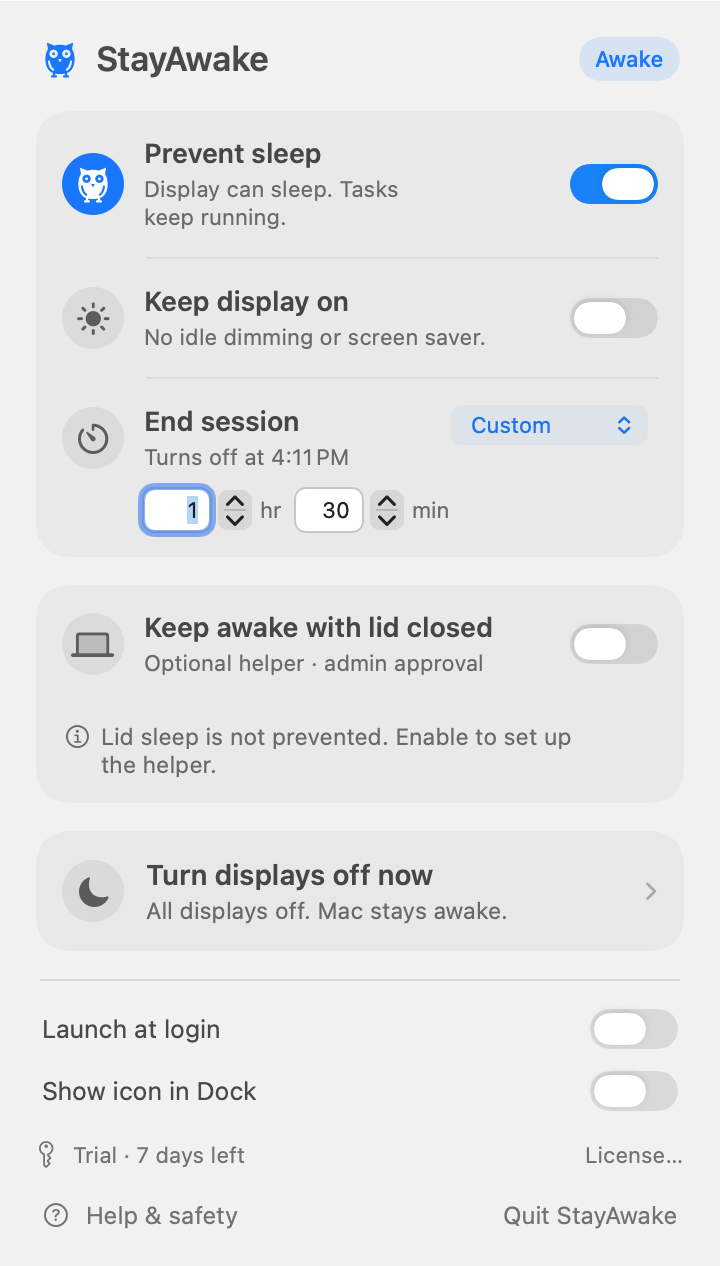
Let the display rest while background tasks run.
 StayAwake
Downloads, renders, backups. A small menu-bar utility that keeps background work from stopping when your Mac goes idle.
macOS 14+ · Apple silicon & Intel · English & 中文
Direct 1.0.0 (build 10) is available to download and buy, with an Apple-notarized installer. If another program (such as a remote-control or keep-awake tool) turns the system sleep setting back while protection runs, this build exits closed-lid protection, restores sleep and says why, instead of fighting the other program. Turn off sleep management in such apps before using closed-lid mode. Low-battery, thermal and session-stop safeguards remain. Closed-lid protection remains experimental: long-duration lid use, physical power-transition tests, frozen-app recovery and the full refund flow are not fully verified. Uninterrupted tasks are not guaranteed. Try it on your own Mac first. Never put a running Mac in a bag.
Let the display rest while background tasks run.
Present, watch and monitor without idle screen savers.
Choose a preset, a custom duration, or no time limit.
Turn all displays off without stopping your Mac.
A native monochrome owl. Filled means on; outlined means off.
An optional signed helper for the direct edition, with heartbeat recovery.
Closed-lid protection is separate from idle-sleep prevention. The direct edition requires approval for a signed background helper. Sleep is restored below 15% battery, at high thermal pressure, when a session ends, or when the app disconnects. Keep ventilation clear. Never put a running Mac in a bag.
Sleep prevention is not a network guarantee. Wi-Fi, VPNs and macOS versions still matter. Test your own Mac before leaving a long task unattended.
Try every feature for 7 days. No card and no automatic renewal. Full refunds within 14 days for website purchases. Tax appears at Paddle checkout.
US$2.99
US$2.99 once · 2 personal Macs · No subscription
The direct edition provides independent closed-lid protection, a 7-day trial and license keys. The sandboxed Store edition currently prepares idle-sleep prevention only, without an administrator helper, and is not listed yet.
Normal sleep prevention needs no administrator, Accessibility or Screen Recording access. Closed-lid protection requires an approved signed helper, not disabling SIP. It temporarily disables system sleep, including manual Sleep, then restores it.
Download the DMG and drag StayAwake to Applications. Configure closed-lid protection separately when needed. Never disable Gatekeeper or ignore macOS security warnings.
The trial works offline. First activation needs internet; paid copies can work offline and periodically validate when online. Network failure does not revoke a paid license.
Request a full refund within 14 days through support or your Paddle receipt. Deactivate the old Mac in License before moving. Each license supports two personal Macs at a time.